
A dpkg error code (1) is a final status, not the cause. Read the lines immediately above it, then repair the interrupted configuration or dependency problem they identify on a Debian, Ubuntu, or Mint system.
Start with the package named above the error
The package name, its version, and a maintainer-script message tell you whether dpkg stopped during configuration, a dependency could not be resolved, or one package needs removal. Run dpkg –audit first to list packages that are only partially installed or configured.
sudo dpkg --audit
An empty result means dpkg did not find an incomplete package state. Keep the package name if the audit reports one, because the next command should address that package rather than remove software at random.
Finish interrupted package configuration
The command configures every unpacked package that has not finished configuring.
sudo dpkg --configure -a

The command can stop again when a package script fails. Keep the full error from that attempt, because it identifies the package or service that needs a package-specific fix.
Repair unmet dependencies with apt
If apt reports unmet dependencies after configuration, ask it to resolve them from your enabled repositories. Check held packages before repairing dependencies when a dependency cannot move to the version apt requires.
sudo apt --fix-broken install
apt may install missing dependencies, complete a pending package action, or ask for confirmation before changing packages. Use the package-manager overview if you need to distinguish apt’s repository work from dpkg’s local package work.
Repair one package only after you know its name
When the output names a package whose configuration cannot complete, reinstall it first. Use purge only when you have checked that removing its configuration will not remove software you need.
sudo apt install --reinstall package-name
Replace package-name with the package shown in the failing output. The earlier screenshot remains useful because it shows the package-management terminal context where the failure is reported.
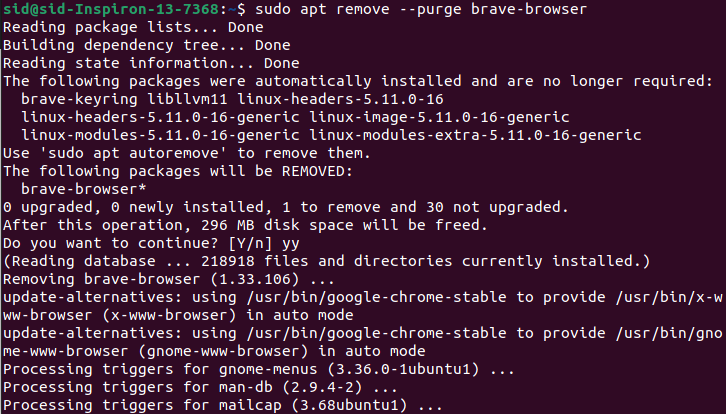
If reinstalling does not resolve a package that you intentionally want to remove, purge that exact package and repair dependencies again.
sudo apt purge package-name
sudo apt --fix-broken install
Do not delete lock files or force an overwrite first
A lock error means another package tool may still be changing the package database. Find the process holding the dpkg frontend lock before you retry any repair command.
A file-overwrite error names two packages that claim the same path. Treat that as a package-conflict diagnosis, not a reason to run a broad force-overwrite command. Compare apt and dpkg responsibilities before working directly with a downloaded Deb package.
Verify the repair
Run the audit again after apt or dpkg completes. Then retry the original install, upgrade, or removal so you can confirm the package transaction finishes without the error.
sudo dpkg --audit
sudo apt update
- Read the package and script name above the final error.
- Run sudo dpkg –configure -a for interrupted configuration.
- Run sudo apt –fix-broken install for unmet dependencies.
- Reinstall or purge only the package named in the failure output.
- Check locks instead of deleting lock files.
Related package-management fixes
A repository download failure needs a different diagnosis from a broken package state. Fix a failed package fetch before repeating dependency repair, and repair an unable-to-locate-package error when apt cannot find the requested package.
Frequently asked questions
The final error line becomes useful when you pair it with the package name and command output above it. Keep that context when you ask for help or decide whether a package needs reinstallation.
What does “sub-process /usr/bin/dpkg returned an error code (1)” mean?
dpkg encountered a package-level failure while apt was completing an install, upgrade, or removal. The lines above the final error name the package and maintainer script that need attention.
Should I run dpkg –configure -a with sudo?
Yes. Reconfiguring packages changes the system package database, so run sudo dpkg –configure -a from an account allowed to use sudo.
When should I use apt –fix-broken install?
Use it after dpkg configuration when apt reports unmet dependencies or packages left unconfigured. It asks apt to resolve dependency problems using the configured repositories.
Can I delete dpkg lock files to fix this error?
No. Check for an active package process first. Deleting a lock while apt or dpkg is writing can damage package-management state.
Run the audit once more after the repair. A clean audit and a successful retry of the original package action show that dpkg is no longer leaving a package transaction unfinished.