

You want Discord on your Linux desktop so you can keep chats and calls outside the browser. The first thing you need is a current download that fits your distribution.
Installing it adds the desktop app and any supporting software it needs through your system’s software tools. Knowing who supplies client updates also means you won’t be left guessing how to keep it current.
Match the Discord package to your distribution
Discord’s Linux download page offers native package files and a Flathub build. Choose the route your distribution supports, because its package manager handles installation and removal.
| System | Package | Install with | Client updates |
|---|---|---|---|
| Debian or Ubuntu | DEB | APT | Discord updater |
| Fedora | RPM | DNF | Discord updater |
| Arch Linux | Repository package or vendor archive | Pacman | Discord updater |
| x86_64 systems with Flatpak | Flatpak | Flathub | Flatpak |
Discord’s official Linux download page links the current native package files.
Check the download architecture
I ran the DEB metadata command and confirmed it reports amd64. Flathub lists the Discord app for x86_64, so check your CPU before installation.
uname -m
On a 64-bit Intel or AMD system, uname -m prints x86_64, which Debian package metadata calls amd64. If the command prints aarch64, do not install the amd64 DEB.
Install Discord from the matching source
Download the official package for your system, then install the local file through its package manager. APT and DNF can resolve dependencies for local packages from their configured sources.
Step 1: Install the DEB on Debian or Ubuntu
The DEB route also fits Linux Mint. Download Discord’s official DEB, then inspect its name and architecture before asking APT to install it.
If you want the download flags explained, see our cURL file-download walkthrough.
curl -fL 'https://discord.com/api/download?platform=linux&format=deb' -o discord.deb
dpkg-deb -f discord.deb Package Version Architecture
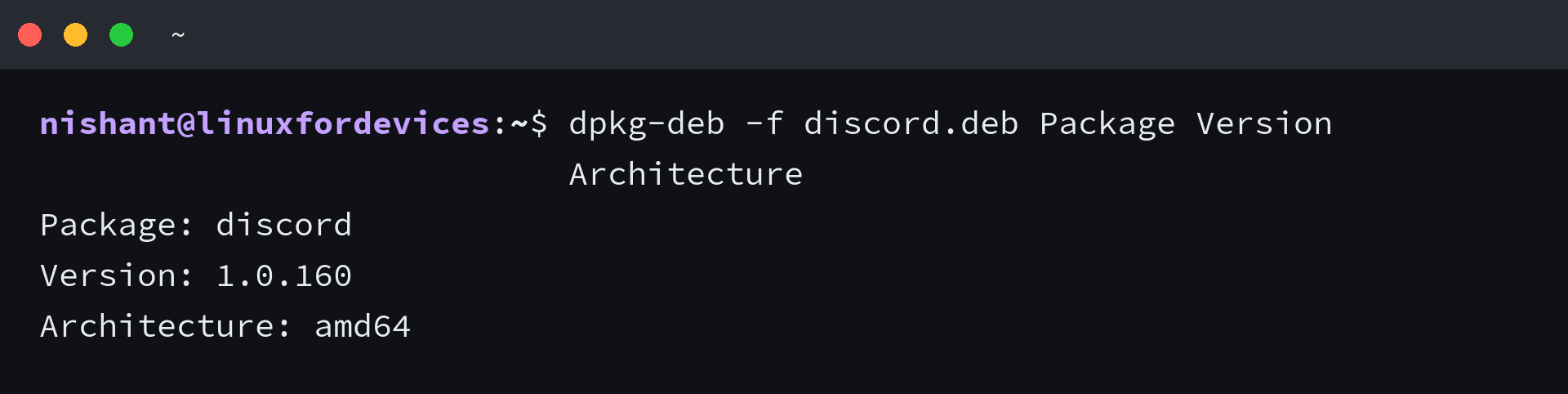
The output confirms this DEB is amd64, so install it on a matching x86_64 system rather than aarch64.
sudo apt install ./discord.deb
The ./ prefix tells APT this is a local file, so APT resolves its dependencies using your configured repositories. For a graphical path, follow our Ubuntu DEB installation steps.
Step 2: Install the RPM on Fedora
Discord now offers a Fedora-compatible RPM. DNF accepts a local path, so its package sources can resolve dependencies during installation.
curl -fL 'https://discord.com/api/download/stable?platform=linux&format=rpm' -o discord.rpm
sudo dnf install ./discord.rpm
DNF’s install examples use local RPM files. A local install does not configure a Discord repository for Fedora.
Step 3: Install Discord on Arch Linux
For a package managed by Arch’s repositories, install discord with Pacman.
sudo pacman -S discord
I compared Discord’s official Arch archive with Arch Extra’s package entry. Extra’s 1:1.0.159-1 package was flagged out of date on 28 September 2026, while the downloaded vendor archive identifies as 1.0.160-1.
I chose the official vendor archive as the fallback when Arch Extra’s package is flagged out of date. Pacman’s -U option installs that local package, as covered in our Pacman command guide.
curl -fL 'https://discord.com/api/download/stable?platform=linux&format=pkg.tar.zst' -o discord.pkg.tar.zst
sudo pacman -U ./discord.pkg.tar.zst
Pacman registers the vendor archive as an installed package too, so remove Discord through Pacman rather than deleting files by hand.
Step 4: Install Discord from Flathub
Use Flatpak once your system has it and the Flathub remote is configured. If the remote is missing, follow Flathub’s setup steps for your distribution first.
Discord’s app ID is com.discordapp.Discord.
flatpak install flathub com.discordapp.Discord
Flathub’s Discord listing says Game Activity and Rich Presence do not work out of the box. Its sandbox also limits file access, which can affect attachments and drag-and-drop.
Verify or remove Discord with its package manager
Use the same source that installed Discord when you check or remove it. A local DEB or RPM install does not add a Discord repository to APT or DNF.
| Install source | Verify | Remove |
|---|---|---|
| Debian or Ubuntu | dpkg-query -W discord | sudo apt remove discord |
| Fedora | rpm -q discord | sudo dnf remove discord |
| Arch repository or vendor archive | pacman -Q discord | sudo pacman -R discord |
| Flathub | flatpak info com.discordapp.Discord | flatpak uninstall com.discordapp.Discord |
APT’s remove and purge operations handle configuration files differently. See our explanation of apt remove and purge before choosing either one.
The Public Test Build (PTB) and Canary are Discord prerelease channels. If you choose Canary, follow our Discord Canary installation steps.
Discord’s native client now updates itself
Discord’s May 2026 patch notes say the Linux client can apply releases through its own updater. You do not need another DEB or RPM for each native-client update.
If you chose Flathub, run this command when you want Flatpak to check for a Discord update.
flatpak update com.discordapp.Discord
Discord on Linux questions
Can I install Discord on Linux Mint?
Yes. Linux Mint uses DEB packages, so follow the Debian or Ubuntu APT instructions.